
Table of Contents
In this article we will set up nginx proxy for prometheus and grafana. In the previous article, you could access prometheus and grafana via IP:Port. However, this does not guarantee the safety of your system; Especially when you use public cloud to build a monitoring system.
Why do you say it’s not safe, because the protocol you’re accessing is HTTP, which means the grafana login account can be sniffed by others when going over the network.
That’s why you need an nginx proxy layer that uses SSL.
Prepare the server
Here I will still use the server with Prometheus and Grafana installed.
If you already have an existing nginx proxy server, you can use it, otherwise you can create a new server.
- 1 vCPU
- 1 GB RAM
- 20(40) GB HDD
- OS: Ubuntu server 18.04
- User: root
Install nginx on Ubuntu 18
We use nginx as the reverse proxy layer.
Add nginx repository to the server.
apt install curl gnupg2 ca-certificates lsb-release -y
echo "deb http://nginx.org/packages/mainline/ubuntu `lsb_release -cs` nginx" | sudo tee /etc/apt/sources.list.d/nginx.list
curl -fsSL https://nginx.org/keys/nginx_signing.key | sudo apt-key add -
apt update
Install nginx.
apt install nginx nginx-module-geoip -yEnable and start the nginx service.
systemctl enable nginx && systemctl start nginxSet up configurations for nginx
Most people when installing nginx will leave the default configuration files, which is not recommended when used for production systems.
Below I will guide you how to set up Nginx proxy.
First, create some necessary folders.
rm -f /etc/nginx/conf.d/default.conf
mkdir -p /etc/nginx/conf.d/resource
mkdir -p /etc/nginx/conf.d/01_default_system
mkdir -p /etc/nginx/conf.d/02_real_domain
mkdir -p /etc/nginx/certificate-ssl/ssl-selfcert
mkdir -p /etc/nginx/dh-selfcert
mkdir /var/log/nginx/real_domain
Next, create local SSL certificates.
openssl req -x509 -nodes -days 3650 -newkey rsa:2048 -keyout /etc/nginx/certificate-ssl/ssl-selfcert/private.key -out /etc/nginx/certificate-ssl/ssl-selfcert/server.crt
openssl dhparam -out /etc/nginx/dh-selfcert/dhparams.pem 4096
Add the following 2 lines at the end of /etc/nginx/nginx.conf file.
include /etc/nginx/conf.d/01_default_system/*.conf;
include /etc/nginx/conf.d/02_real_domain/*.conf;
We create a proxy pass parameter file, this file is commonly used for future virtual host files.
nano /etc/nginx/conf.d/resource/proxypass.incCopy the content below into the file proxypass.inc.
proxy_set_header            Host $host;
proxy_set_header            X-Real-IP $remote_addr;
proxy_set_header            X-Forwarded-For $proxy_add_x_forwarded_for;
proxy_set_header            X-Forwarded-Proto $scheme;
proxy_set_header            Proxy "";
proxy_connect_timeout       120s;
proxy_send_timeout          12s;
proxy_read_timeout          12s;
proxy_buffer_size           32k;
proxy_buffers               64 32k;
proxy_busy_buffers_size     64k;
proxy_temp_file_write_size  64k;
proxy_max_temp_file_size    1024m;
proxy_redirect              off;
Next create the SSL parameter file.
nano /etc/nginx/conf.d/resource/letencrypt_ssl.incCopy the content below into file letsencrypt_ssl.inc.
ssl_session_cache shared:SSL:10m;
ssl_session_timeout 10m;
ssl_protocols TLSv1 TLSv1.1 TLSv1.2;
ssl_dhparam     /etc/nginx/dh-selfcert/dhparams.pem;
ssl_ecdh_curve  secp384r1;
ssl_prefer_server_ciphers on;
ssl_ciphers EECDH+ECDSA+AESGCM:EECDH+aRSA+AESGCM:EECDH+ECDSA+SHA512:EECDH+ECDSA+SHA384:EECDH+ECDSA+SHA256:ECDH+AESGCM:ECDH+AES256:DH+AESGCM:DH+AES256:RSA+AESGCM:!aNULL:!eNULL:!LOW:!RC4:!3DES:!MD5:!EXP:!PSK:!SRP:!DSS;
resolver 8.8.8.8 8.8.4.4 valid=300s;
resolver_timeout 5s;
We create a default config file to replace the default file deleted above.
nano /etc/nginx/conf.d/01_default_system/local.confCopy the content to the local.conf file.
server {

    ##### REMOVE ACCESS TO INVALID DOMAIN #####
    ###########################################

    listen 80 default_server;
    listen 443 ssl default_server;
    server_name _;
    ssl_certificate /etc/nginx/certificate-ssl/ssl-selfcert/server.crt;
    ssl_certificate_key /etc/nginx/certificate-ssl/ssl-selfcert/private.key;
    return 444;

    ##### SET BLOCK METHOD #####
    ############################

    # Do not accept DELETE, SEARCH and other methods
    if ($request_method !~ ^(GET|HEAD|POST)$ ) {
        return 444;
    }

    ##### SET UP BLOCK AGENT/BOT #####
    ##################################

    # Block download agents
    if ($http_user_agent ~* LWP::Simple|BBBike|wget) {
        return 444;
    }

    # Block some robots
    if ($http_user_agent ~* msnbot|scrapbot) {
        return 444;
    }

    # Deny certain Referers
    if ( $http_referer ~* (babes|forsale|girl|jewelry|love|nudit|organic|poker|porn|sex|teen) ) {
        return 444;
    }
}

server {

    listen 80;
    server_name localhost;

    location / {
        allow 127.0.0.1;
        deny all;
    }

    location /basic_status {
        allow 127.0.0.1;
        deny all;
        stub_status;
        access_log off;
    }
}
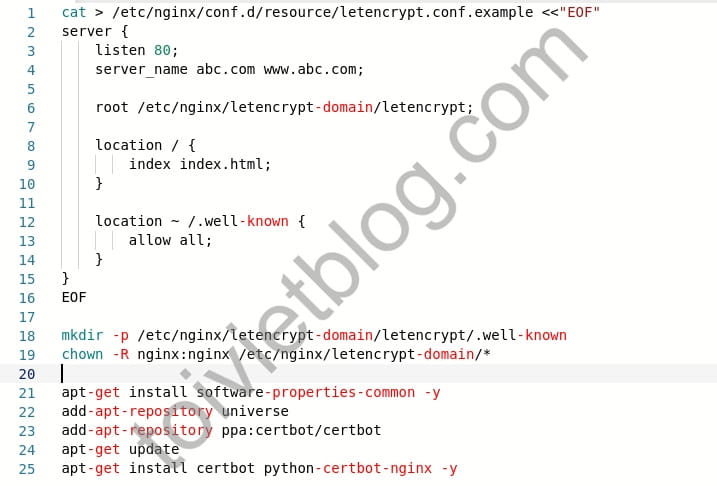
Create a sample virtual host file to register the ssl cert.
nano /etc/nginx/conf.d/resource/letencrypt.conf.exampleCopy the content below into the letsencrypt.conf.example file.
server {
    listen 80;
    server_name abc.com www.abc.com;

    root /etc/nginx/letencrypt-domain/letencrypt;

    location / {
        index index.html;
    }

    location ~ /.well-known {
        allow all;
    }
}
Create default directory for ssl cert.
mkdir -p /etc/nginx/letencrypt-domain/letencrypt/.well-known
chown -R nginx:nginx /etc/nginx/letencrypt-domain/*
Install Let’s Encrypt for nginx proxy on Ubuntu 18
As mentioned above, we use nginx proxy with SSL. If you don’t use SSL, installing nginx proxy doesn’t make any sense.
Here, we will use the free Let’s Encrypt certificate. If you have a purchased (commercial) certificate, this section may not be necessary.
We add the Certbot repository and install the certbot package for the nginx web server.
apt-get install software-properties-common -y
add-apt-repository universe
add-apt-repository ppa:certbot/certbot
apt-get update
apt-get install certbot python-certbot-nginx -y
Create SSL certificates for Prometheus and Grafana domains
Suppose I will use 2 domains for Prometheus and Grafana as follows:
- prometheus.example.com
- grafana.example.com
Please repeat the steps below for each domain.
Copy the sample ssl file for the new domain.
cd /etc/nginx/conf.d/02_real_domain/
cp ../resource/letencrypt.conf.example 01.conf
Replace the domain name inside the temporary virtual host config file. The command below will replace the word abc (in abc.com) with prometheus.example (in prometheus.example.com that we placed above).
sed -i 's|abc|prometheus.example|g' 01.confReload nginx and register the SSL certificate. Remember to replace your real email address and domain in the SSL registration command below.
service nginx reload
certbot certonly --webroot --webroot-path=/etc/nginx/letencrypt-domain/letencrypt --email [email protected] --agree-tos -d prometheus.example.com
After successfully registering the SSL certificate, you create a virtual host file for the prometheus domain.
rm -f 01.conf
nano /etc/nginx/conf.d/02_real_domain/prometheus.example.com.conf
Copy the content below into the virtual host file. Remember to replace your real domain in the file below.
upstream prometheus.example.com {
    server 127.0.0.1:9090 max_fails=2 fail_timeout=5s;
}

server {
    listen 80;
    server_name prometheus.example.com www.prometheus.example.com;
    return 301 https://prometheus.example.com$request_uri;
}

server {
    listen 443 ssl http2;
    server_name prometheus.example.com www.prometheus.example.com;

    if ($host = 'www.prometheus.example.com') {
        return 301 https://prometheus.example.com$request_uri;
    }

    include /etc/nginx/conf.d/resource/letencrypt_ssl.inc;
    ssl_certificate         /etc/letsencrypt/live/prometheus.example.com/fullchain.pem;
    ssl_certificate_key     /etc/letsencrypt/live/prometheus.example.com/privkey.pem;

    error_log	/var/log/nginx/real_domain/prometheus.example.com.error.log;
    access_log	/var/log/nginx/real_domain/prometheus.example.com.access.log vhost;

    location / {
        proxy_pass   http://prometheus.example.com;
        include /etc/nginx/conf.d/resource/proxypass.inc;
    }

    location /.well-known/acme-challenge/ {
        root /etc/nginx/letencrypt-domain/letencrypt;
        default_type text/plain;
    }
}
Check and reload nginx configuration.
nginx -t
service nginx reload
At this point, you have completed SSL registration and created a virtual host on the proxy for the prometheus domain. You repeat the previous steps with the grafana domain, or other domains you want.
Conclusion
Now you can open your browser and access prometheus and grafana through the domain you set. The access protocol used is HTTPS so you can rest assured that data is transmitted encrypted. At the same time, using a proxy is also more professional than accessing using IP:Port, right?

