
Table of Contents
Fix your access to this site has been limited. If at some point, you encounter this error when logging into your Wordpress website, “Your access to this site has been temporarily limited by the site owner”. You also don’t need to worry too much that the website has any errors.
The reason the error appeared
The reason you are encountering this message is because of the Wordfence plugin. For some reason, you may have entered the wrong user or password too many times. Or maybe your IP address is accidentally on the blocked list.
Wordfence will rely on these failed accesses to block your IP. And of course, you will receive an access notification as shown below.
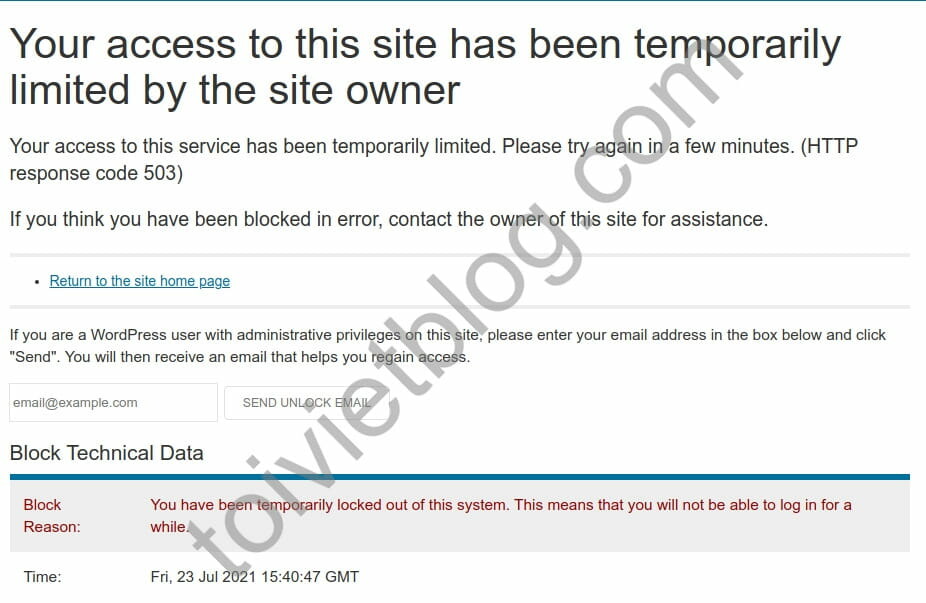
Fix “Your access to this site has been temporarily limited by the site owner”
To fix this error is actually quite simple. If you are using a hosting panel like cPanel, VestaCP, aaPanel,… then log in to the panel.
- Open your website’s phpMyAdmin database.
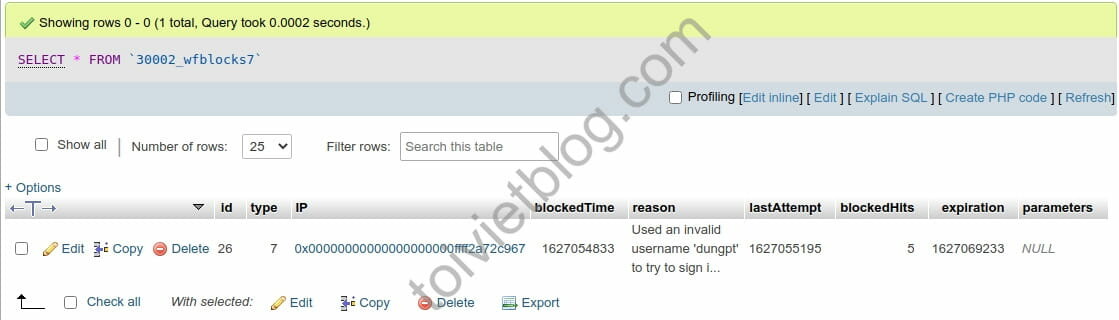
- Find the table
wp_wfblocks7 - Delete the line that corresponds to your IP address or you can select Select All and Delete all.
The wp_wfblocks7 table will be similar to the image below. Click the Delete button with the red line icon and you’re done.
In case you do not use phpMyAdmin but use CLI, please use the commands below.
To list all IPs that are blocked by Wordfence.
SELECT * FROM `wp_wfblocks7`;To delete data in table wp_wfblocks7. Note to change wp_ to the corresponding prefix you are using for the database.
DELETE * FROM `wp_wfblocks7`;Conclusion
With such a small technique, you can solve the above accidental error. Some guides on the internet will tell you to delete the Wordfence plugin. But that is not necessary, you just need to delete exactly what we need. Now you can log in to your Wordpress website normally again.

