
Table of Contents
In this article, I will share my experience with an unmanageable KMS key. This is a pretty interesting thing with AWS that I have just experienced after many years of working.
The situation of an unmanageable KMS key
When I work on projects related to banks or fintech platforms, security is always a top requirement. And one of the criteria when creating resources on AWS is least privilege.
This means only granting the minimum privileges to the services needed to access the necessary resources, and very specifically.
I use CloudFormation (abbreviated as CFN) to manage the infrastructure, and one of the resources that is always created on AWS is the KMS key.
And I have a KMS key that serves access from RDS and CloudFormation services.
Basically, no IAM principal or any other service will have access to this KMS key. In addition, the KMS key also has a policy set to prevent key deletion.
Below is a snippet of the template I am using.
  DBKMSKey:
    Type: AWS::KMS::Key
    Properties:
      Description: Database Key
      Enabled: true
      EnableKeyRotation: true
      MultiRegion: true
      KeyPolicy:
        Version: "2012-10-17"
        Id: !Sub ${Env}-db-key
        Statement:
          - Sid: Deny Key Deletion
            Effect: Deny
            Principal:
              AWS: "*"
            Action:
              - kms:DeleteAlias
              - kms:DeleteKey
              - kms:DisableKey
              - kms:ScheduleKeyDeletion
            Resource: "*"
          - Sid: Allow access through RDS for all principals in the account that are authorized to use RDS
            Effect: Allow
            Principal:
              AWS: "*"
            Action:
              - kms:CreateGrant
              - kms:Decrypt
              - kms:DescribeKey
              - kms:Encrypt
              - kms:GenerateDataKey*
              - kms:ListGrants
              - kms:ReEncrypt*
            Resource: "*"
            Condition:
              StringEquals:
                kms:ViaService: !Sub rds.${AWS::Region}.amazonaws.com
                kms:CallerAccount: !Sub ${AWS::AccountId}
          - Sid: Allow access to Deployer role
            Effect: Allow
            Principal:
              AWS: !Sub arn:aws:iam::${AWS::AccountId}:role/${Env}-cfn-role
            Action:
              - kms:CreateAlias
              - kms:Decrypt
              - kms:DescribeKey
              - kms:EnableKeyRotation
              - kms:Encrypt
              - kms:GenerateDataKey*
              - kms:PutKeyPolicy
              - kms:ReEncrypt*
            Resource: "*"
Normally, this KMS key would be created through the CloudFormation stack. But because my nested stack has another resource that failed to create, the entire stack would be automatically deleted.
And now the problem occurs, because the KMS key has a policy that prevents deletion, so the CloudFormation stack fails to delete.
When I use the Administrator user to try to delete this KMS key, I get the message You do not have permission to access the KMS keys.

At this point, you might be saying, “Why don’t you just rename the KMS key resource in the CloudFormation template and recreate a new stack?”
Yes, that’s simple but not acceptable in an enterprise environment.
- First, I can’t just leave the undeletable resource there, you can understand that “I’m not allowed to litter” the system environment.
- Second, to ensure consistency in the naming of resources between environments such as Dev, QA, UAT,… I have to recreate the resource with the same name.
At now, the problem appeared. The CloudFormation stack could not be deleted because the deletion of the KMS key failed (because the key had a policy preventing deletion). And I, as an administrator, could not access the key.
At this point, you can understand that it has become an unmanageable KMS key.
How did I deal with the unmanageable KMS key?
Below is the process by which I dealt with the unmanageable KMS key.
Try using the root account of the AWS account
Because I only have administrative rights in the AWS account, not the root account.
So the first solution that I thought of was to ask for help from my manager, who is holding the root account.
After he logged in to the root account and tried to access the unmanageable KMS key. He also received the same error message as me.
The way AWS resources are managed is very strict, to the point that even the root account cannot do anything.
Try contacting AWS Support
Then I thought of contacting AWS Support. Through previous cases I have worked with them, I know they have internal tools to interfere with AWS users’ resources.
I am hoping they can help me delete this unmanageable KMS key.
But they couldn’t help me. First, they said they didn’t have the permission to access and delete the KMS key either.
Next, they told me there was a process to unlock the kms key policy. After I followed this process, the support staff said he raised the issue with the internal team and they were looking into it.
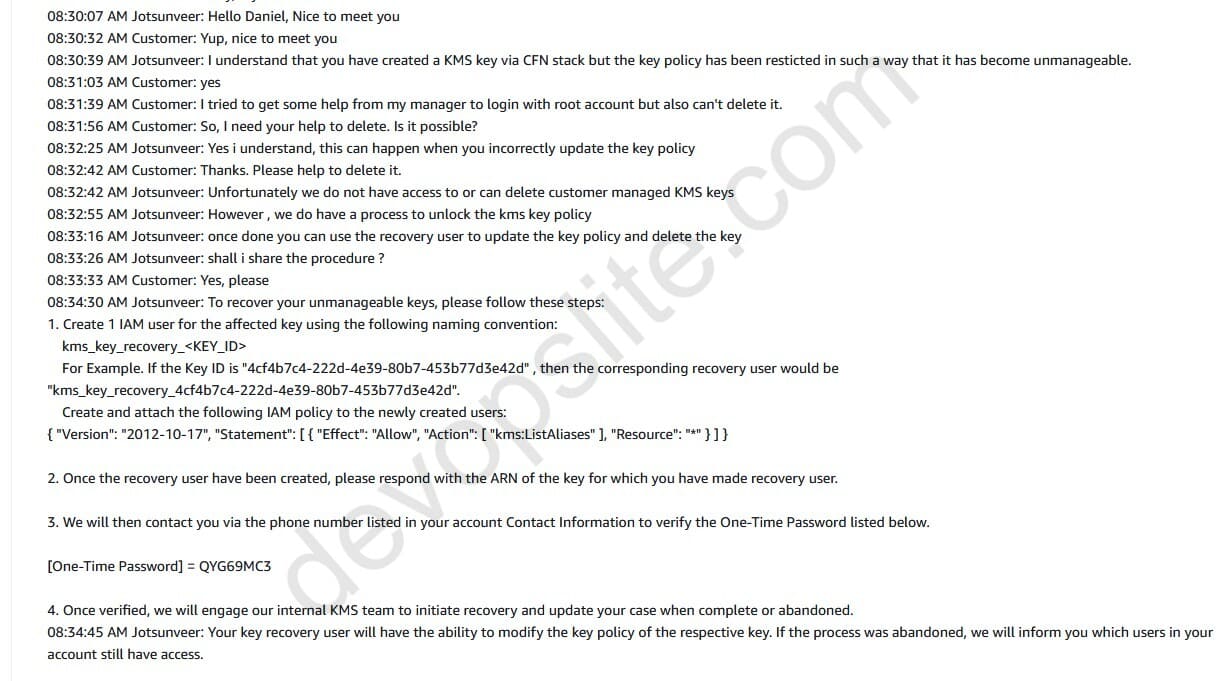
After a while, he said they just announced that there is a CFN role with kms:PutKeyPolicy permission, I can use this role. Nothing else.
Now it’s a problem again, because the role arn:aws:iam::${AWS::AccountId}:role/${Env}-cfn-role that I specified in the CFN template is only used for the CFN stack.
And the user I am using is assume-role from Azure AD. So, directly, I have no way to use ${Env}-cfn-role. I also asked the support staff how to switch to using the cfn-role role, but he didn’t know either.
After finishing the chat and about 30 minutes of calling via https://chime.aws, I told the support staff that I would figure out how to handle it myself.
Using a Lambda function with a CloudFormation role
Although the support staff didn’t get to my issue directly, he did remind me about the cfn-role having the authority to change the KMS key policy.
Now, I think about how to use this role to update the KMS key policy. Because AWS environment has many different access constraints, it will be a bit difficult.
After considering the possibilities, I decided to use a Lambda function to do this.
Basically, I will write a Lambda function and set the execution role with the existing arn:aws:iam::${AWS::AccountId}:role/${Env}-cfn-role. Since this is the only role that has the right to interfere with the KMS key at this point.
In order for Lambda to use this role, I need to adjust its Trust relationships. By adding the following trust policy section.
{
	"Version": "2012-10-17",
	"Statement": [
		{
			"Effect": "Allow",
			"Principal": {
				"Service": "lambda.amazonaws.com"
			},
			"Action": "sts:AssumeRole"
		}
	]
}
Next, when creating the Lambda function, I will choose cfn-role for the execution role.
Below is my Lambda code, it uses Python 3.12 runtime. Please replace the values in this function if you want to use it:
- Env: this is my environment name, you can remove it if you don’t need it.
- kms_key_id:
- region: replace with the region containing your resource, for example ap-southeast-1.
- account-id: replace with the ID of your AWS account, a 12-digit string.
- 4cf4b7c4-222d-4e39-80b7-453b77d3e42d: replace with the KMS key ID that you need to manipulate.
import json
import boto3

# Define global variables
Env = "dev"
kms_key_id = "arn:aws:kms:region:account-id:key/4cf4b7c4-222d-4e39-80b7-453b77d3e42d" # Assign KMS key ID value here

def lambda_handler(event, context):
    # Get information from event
    # Can use kms_key_id from global variable if not need to get from event
    key_id = kms_key_id # If you want to use global variables

    if not key_id:
        return {
            'statusCode': 400,
            'body': json.dumps('key_id is required')
        }

    # Define new policy
    new_policy = {
        "Version": "2012-10-17",
        "Id": f"{Env}-db-key",
        "Statement": [
            {
                "Sid": "Enable DevSecOps Permissions",
                "Effect": "Allow",
                "Principal": {
                    "AWS": "arn:aws:sts::account-id:assumed-role/DevSecOps/[email protected]"
                },
                "Action": [
                    "kms:CancelKeyDeletion",
                    "kms:Create*",
                    "kms:Delete*",
                    "kms:Describe*",
                    "kms:Disable*",
                    "kms:Enable*",
                    "kms:Get*",
                    "kms:List*",
                    "kms:Put*",
                    "kms:Revoke*",
                    "kms:RevokeGrant",
                    "kms:ScheduleKeyDeletion",
                    "kms:Update*"
                ],
                "Resource": "*"
            },
            {
                "Sid": "Allow access through RDS for all principals in the account that are authorized to use RDS",
                "Effect": "Allow",
                "Principal": {
                    "AWS": "*"
                },
                "Action": [
                    "kms:CreateGrant",
                    "kms:Decrypt",
                    "kms:DescribeKey",
                    "kms:Encrypt",
                    "kms:GenerateDataKey*",
                    "kms:ListGrants",
                    "kms:ReEncrypt*"
                ],
                "Resource": "*",
                "Condition": {
                    "StringEquals": {
                        "kms:ViaService": f"rds.{context.invoked_function_arn.split(':')[3]}.amazonaws.com",
                        "kms:CallerAccount": f"{context.invoked_function_arn.split(':')[4]}"
                    }
                }
            },
            {
                "Sid": "Allow access to Deployer role",
                "Effect": "Allow",
                "Principal": {
                    "AWS": f"arn:aws:iam::{context.invoked_function_arn.split(':')[4]}:role/{Env}-cfn-role"
                },
                "Action": [
                    "kms:Decrypt",
                    "kms:DescribeKey",
                    "kms:EnableKeyRotation",
                    "kms:Encrypt",
                    "kms:GenerateDataKey*",
                    "kms:PutKeyPolicy",
                    "kms:ReEncrypt*"
                ],
                "Resource": "*"
            }
        ]
    }

    # Create client for KMS
    kms_client = boto3.client('kms')

    try:
        # Update policy for KMS key
        response = kms_client.put_key_policy(
            KeyId=key_id,
            PolicyName='default',
            Policy=json.dumps(new_policy)
        )

        return {
            'statusCode': 200,
            'body': json.dumps('Policy updated successfully')
        }

    except Exception as e:
        return {
            'statusCode': 500,
            'body': json.dumps(f'Error updating policy: {str(e)}')
        }
What will the above Lambda function do? It will use the cfn-role assigned to the Lambda function to manipulate the KMS key. Specifically, it will update the key’s policy with the new policy defined in new_policy = {} in the above function.
The new policy will allow my role DevSecOps to have access to the key, and at the same time remove the policy that prevents the key from being deleted.
After creating the Lambda function, I just click Test -> Invoke to run the function. Wait a few minutes for it to complete the job.
After the Lambda function finished running, I was able to clear the CFN stack again and this time it succeeded. Problem solved.
Lessons learned from unmanageable KMS key
These lessons can be applied to all other resources besides KMS key.
Lesson #1: Always allow root user access to resources. For example KMS rights below.
          - Sid: Enable IAM Root Permissions
            Effect: Allow
            Principal:
              AWS: !Sub arn:aws:iam::${AWS::AccountId}:root
            Action:
              - kms:CancelKeyDeletion
              - kms:Create*
              - kms:Delete*
              - kms:Describe*
              - kms:Disable*
              - kms:Enable*
              - kms:Get*
              - kms:List*
              - kms:Put*
              - kms:Revoke*
              - kms:RevokeGrant
              - kms:ScheduleKeyDeletion
              - kms:Update*
            Resource: "*"
Lesson #2: Temporarily disable policies that prevent resource deletion until your CFN stack (or IaC stack) is complete. You can enable that policy later.
Lesson #3: Always create a role for the IaC stack with the right to edit the resource policy. This might save you in the end.
These are the three lessons I learned from this experience. Even though I have been working with Terraform and CloudFormation for several years, there are still things that cannot be predicted. We always have something to learn.
Conclusion
Above is my experience with an unmanageable KMS key. This is an interesting experience for me personally.
Because although I have been working for more than 10 years, this is the first time I have faced such a situation. Anyway, it is still very useful.
I hope this article of mine can bring some useful information to you, helping you avoid unnecessary problems in your work.

