
Table of Contents
How to delete S3 bucket with large number of objects? This is the problem that I have encountered and maybe some of you will encounter too.
I have a bucket with millions of objects and when I need to delete it, the problem occurs. Well, normally, S3 bucket will ask you to empty it before you can delete the bucket.
And when I click empty bucket, it takes hours, even days. So what to do when I need to delete it in 1-2 hours.
Problems with buckets with large number of objects
I have done many projects using AWS before and some of them have S3 storage up to TB but I have never encountered this situation.
I noticed that S3 bucket deletes objects without caring about their capacity, only the quantity.
For example, I have 10 objects and each object is 10G, the total is 100G, I can delete it quite quickly in a few minutes.
On the contrary, with only 100 – 200 MB but I have hundreds of thousands of objects, S3 will delete it in hours, even though the capacity is much lower.
How to delete S3 bucket with large number of objects?
Back to the problem, how can we delete an S3 bucket with a large number of objects, from hundreds of thousands to millions of objects?
After searching online and from AWS articles, I came up with the solution they recommend is to use the LifeCycle feature of S3 bucket to expire objects and delete them automatically.
So what are the steps?
Temporarily disable Versioning feature
The first thing you need to do is temporarily disable Versioning in your bucket, if you are using it.
Simply select the Bucket you want to delete, in the Properties tab, click the Edit button in the Bucket Versioning section.
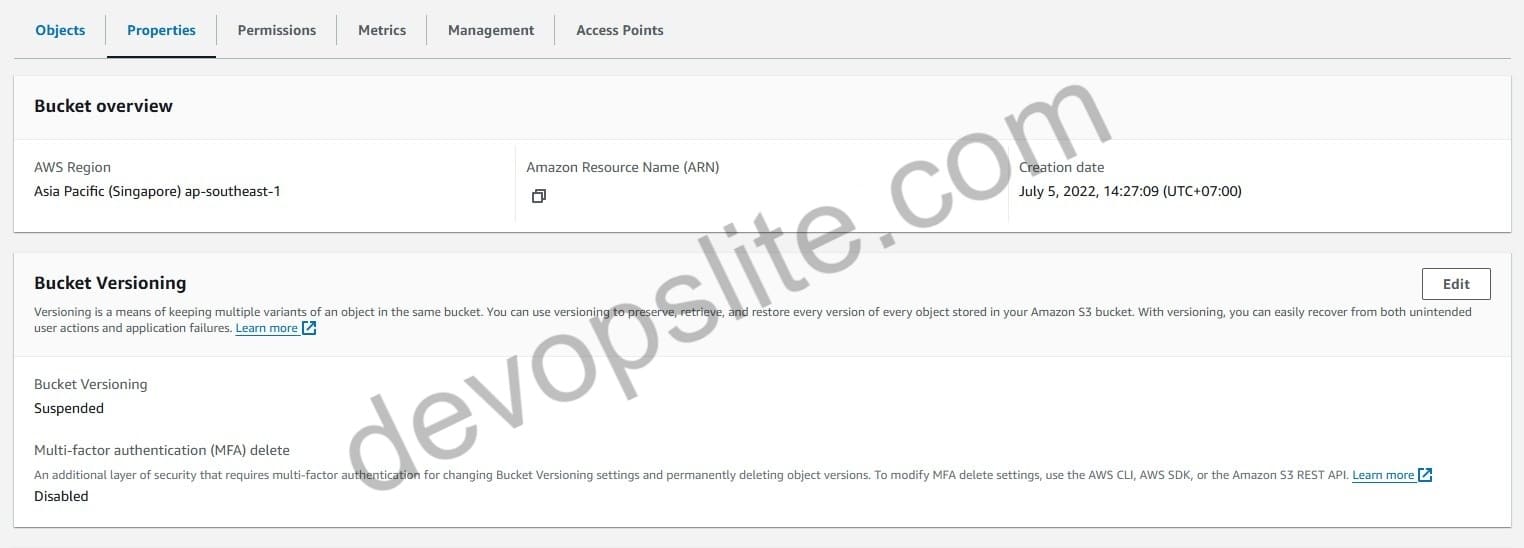
Then select Suspend and save.

Create Lifecycle rules
Next, you need to create Lifecycle rules to automatically delete objects in the bucket.
We will need 2 rules to do this.
- The first rule, I named
delete_object, has the effect of expiring existing objects after 1 day. - The second rule, I named
delete_marker, it will delete Delete markers.
Go to the Management tab and create 2 rules like the image below.

Details of the 2 rules are below.


What happens after you create it? Just wait for the results.
According to this article from AWS, the S3 lifecycle runs once a day, which sounds like your rule will be applied the next day. That’s the theory.
S3 Lifecycle doesn’t actually work
If you have done the above 2 steps as I just instructed and your bucket is emptied successfully then congratulations, because you are lucky.
In my case, it did not work. I waited 1 week since creating the rules and then checked the bucket, it was still the same, nothing changed.
AWS only mentions that S3 Lifecycle runs once a day but they do not mention when the rule is finished running.
Or how do we know if the rule has run and run successfully? No, there is no way to know.
So now it doesn’t work, what do we do now?
You can try to contact AWS Support to ask them to delete the bucket but this is quite risky.
Because with the experience of working with AWS Support many times before for many different issues. Sometimes they can’t help and just waste your time by 1 day just calling and responding to the ticket.
In my case, instead of waiting for a few more weeks without knowing if the Lifecycle rule is effective or not. I choose to click Empty bucket from the Console.

I will wait until the number of deleted objects stops (I think the deletion process is suspended) then I will cancel the Empty and continue to click Empty again. Repeat this until the bucket is empty.
This will take a long time and I don’t have a definite time frame for when it will be done, but at least I don’t have to wait a week with Lifecycle without anything changing. Wish me luck.
You might ask why not use CLI? Well I tried it and it is no different than console.
The delete bucket command from CLI will hang for hours until the CLI session expires and is terminated. It is completely useless.
Conclusion
So, I have given you a guide on how to use Lifecycle to delete a bucket with a large number of objects.
And I have also given you the harsh reality that it does not work (you can search on the internet and see that many people use it and it does not work).
Sometimes AWS is just bad and we have to accept it. Good luck.

