
Table of Contents
Display appropriate commands in Linux with the apropos command. This article will write about this apropos command, what is it and how to use it?
In Linux, perhaps few users know of the apropos command. Personally, when I researched Linux deeply, I knew it.
Display appropriate commands with apropos command
Now what will we say this apropos command does?
For example, if you have a need to list a list of man pages of a particular search term, it may be a command that you don’t know for sure.
At this point, you can use apropos. The apropos command is used to display a list of appropriate man pages based on search keywords. This list is in short description.
Recommended Reading: The command types are in the Linux system
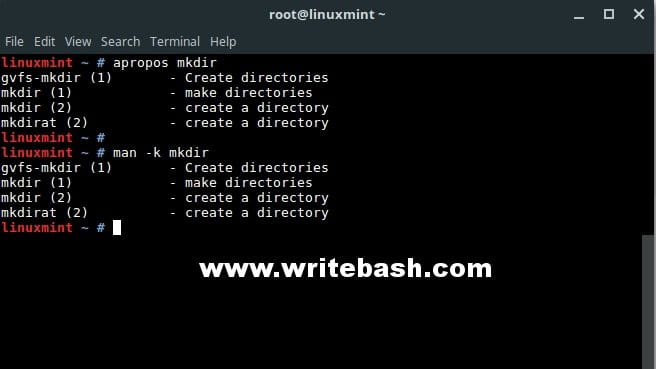
Look at the example below, I want to see if there are any man pages related to mkdir.
$ apropos mkdir
gvfs-mkdir (1)       - Create directories
mkdir (1)            - make directories
mkdir (2)            - create a directory
mkdirat (2)          - create a directory
Or simply, I want to see if there are any man pages related to the dir. I’m not sure what command, but I want to know the commands related to the directory.
$ apropos dir
acyclic (1)          - make directed graph acyclic
addgnupghome (8)     - Create .gnupg home directories
alphasort (3)        - scan a directory for matching entries
anemotaxis (6x)      - directional search on a plane.
basename (1)         - strip directory and suffix from filenames
bdflush (2)          - start, flush, or tune buffer-dirty-flush daemon
bindtextdomain (3)   - set directory containing message catalogs
chacl (1)            - change the access control list of a file or directory
chdir (2)            - change working directory
chroot (2)           - change root directory
chroot (8)           - run command or interactive shell with special root dir...
closedir (3)         - close a directory
cp (1)               - copy files and directories
...
The apropos command and the man command
There is an interesting point between these two commands.
Use the command apropos equivalent to using the man command with the -k option.
Look at the man page of the man command itself, as shown below, notice the -k options section.
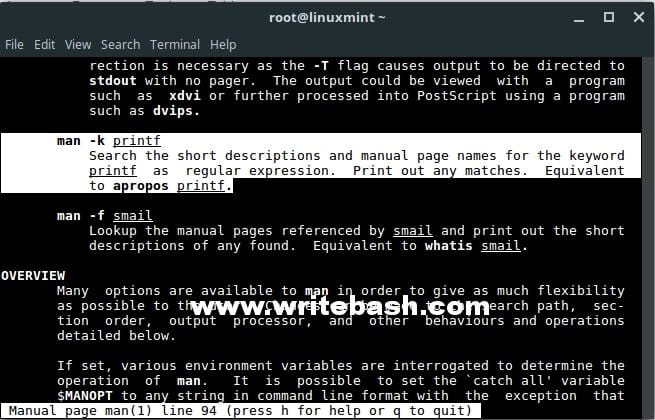
So, you can use the man -k command or the apropos command, both of which give the same results. For example, below:
Conclusion
A command is rarely used, but in some cases it will help you. Remember that, learning as many commands on Linux as possible.
(This is an article from my old blog that has been inactive for a long time, I don’t want to throw it away so I will keep it and hope it helps someone).

