
Table of Contents
Zimbra error /opt/zimbra/bin/zmlocalconfig: line 83: exec: java: not found. Why do I encounter this error? And how do I fix this.
Let’s read the article.
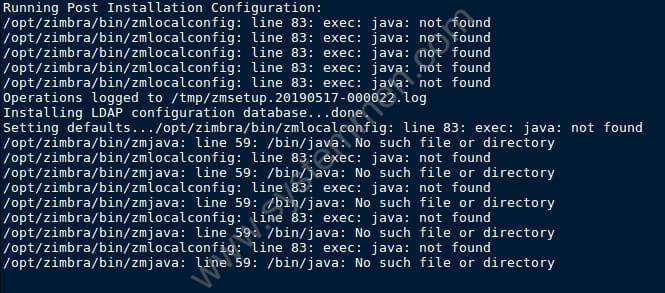
Zimbra java not found error when reinstalling Zimbra
As my previous post on how to uninstall Zimbra on your mail server. Just like you, when I first did it, no problem happened.
But when I reinstalled Zimbra on the server itself. I have encountered a Java-related error. It looks like this.
Running Post Installation Configuration:
/opt/zimbra/bin/zmlocalconfig: line 83: exec: java: not found
/opt/zimbra/bin/zmlocalconfig: line 83: exec: java: not found
/opt/zimbra/bin/zmlocalconfig: line 83: exec: java: not found
/opt/zimbra/bin/zmlocalconfig: line 83: exec: java: not found
/opt/zimbra/bin/zmlocalconfig: line 83: exec: java: not found
Operations logged to /tmp/zmsetup.20190517-000022.log
Installing LDAP configuration database...done.
Setting defaults.../opt/zimbra/bin/zmlocalconfig: line 83: exec: java: not found
/opt/zimbra/bin/zmjava: line 59: /bin/java: No such file or directory
/opt/zimbra/bin/zmlocalconfig: line 83: exec: java: not found
/opt/zimbra/bin/zmjava: line 59: /bin/java: No such file or directory
/opt/zimbra/bin/zmlocalconfig: line 83: exec: java: not found
/opt/zimbra/bin/zmjava: line 59: /bin/java: No such file or directory
/opt/zimbra/bin/zmlocalconfig: line 83: exec: java: not found
/opt/zimbra/bin/zmjava: line 59: /bin/java: No such file or directory
/opt/zimbra/bin/zmlocalconfig: line 83: exec: java: not found
/opt/zimbra/bin/zmjava: line 59: /bin/java: No such file or directory
I was initially puzzled as to why this error did not occur at the first installation. It only appeared after I uninstalled Zimbra and installed it.
There is something wrong with uninstalling Zimbra. And after a while of searching, I found the reason.
Fix java not found error when reinstalling Zimbra
I searched for information for a while and found that uninstalling Zimbra via the ./install.sh -u command will not completely uninstall the installed Zimbra packages on the server.
Because I’m using CentOS 7, so I use the following command to find zimbra packages still on the server.
[root@mail ~]# rpm -aq|grep zimbra
zimbra-openjdk-11.0.2-1zimbra8.8b1.el7.x86_64
As a result, the zimbra-openjdk package is still in the server. I need to remove it from the server.
Execute the following command to remove it from the server.
[root@mail ~]# rpm -e zimbra-openjdk
warning: file /opt/zimbra/common/lib/jvm/openjdk-11.0.2-zimbra/release: remove failed: No such file or directory
warning: file /opt/zimbra/common/lib/jvm/openjdk-11.0.2-zimbra/lib/tzdb.dat: remove failed: No such file or directory
warning: file /opt/zimbra/common/lib/jvm/openjdk-11.0.2-zimbra/lib/src.zip: remove failed: No such file or directory
warning: file /opt/zimbra/common/lib/jvm/openjdk-11.0.2-zimbra/lib/server/libjvm.so: remove failed: No such file or directory
warning: file /opt/zimbra/common/lib/jvm/openjdk-11.0.2-zimbra/lib/server/libjsig.so: remove failed: No such file or directory
warning: file /opt/zimbra/common/lib/jvm/openjdk-11.0.2-zimbra/lib/server/Xusage.txt: remove failed: No such file or directory
warning: file /opt/zimbra/common/lib/jvm/openjdk-11.0.2-zimbra/lib/server: remove failed: No such file or directory
warning: file /opt/zimbra/common/lib/jvm/openjdk-11.0.2-zimbra/lib/security/public_suffix_list.dat: remove failed: No such file or directory
warning: file /opt/zimbra/common/lib/jvm/openjdk-11.0.2-zimbra/lib/security/default.policy: remove failed: No such file or directory
warning: file /opt/zimbra/common/lib/jvm/openjdk-11.0.2-zimbra/lib/security/cacerts: remove failed: No such file or directory
warning: file /opt/zimbra/common/lib/jvm/openjdk-11.0.2-zimbra/lib/security/blacklisted.certs: remove failed: No such file or directory
warning: file /opt/zimbra/common/lib/jvm/openjdk-11.0.2-zimbra/lib/security: remove failed: No such file or directory
warning: file /opt/zimbra/common/lib/jvm/openjdk-11.0.2-zimbra/lib/psfontj2d.properties: remove failed: No such file or directory
warning: file /opt/zimbra/common/lib/jvm/openjdk-11.0.2-zimbra/lib/psfont.properties.ja: remove failed: No such file or directory
warning: file /opt/zimbra/common/lib/jvm/openjdk-11.0.2-zimbra/lib/modules: remove failed: No such file or directory
warning: file /opt/zimbra/common/lib/jvm/openjdk-11.0.2-zimbra/lib/libzip.so: remove failed: No such file or directory
warning: file /opt/zimbra/common/lib/jvm/openjdk-11.0.2-zimbra/lib/libverify.so: remove failed: No such file or directory
warning: file /opt/zimbra/common/lib/jvm/openjdk-11.0.2-zimbra/lib/libunpack.so: remove failed: No such file or directory
warning: file /opt/zimbra/common/lib/jvm/openjdk-11.0.2-zimbra/lib/libsunec.so: remove failed: No such file or directory
warning: file /opt/zimbra/common/lib/jvm/openjdk-11.0.2-zimbra/lib/libsplashscreen.so: remove failed: No such file or directory
...
... means that log for this part is still there but I can’t copy it all in the article, because it’s too long.
And then, I did the Zimbra reinstallation and it succeeded. That’s it.
Conclusion
It’s just a small thing but can make us troubled. Anyway, this is the experience that I want to share with you, hope it helps you.
(This is an article from my old blog that has been inactive for a long time, I don’t want to throw it away so I will keep it and hope it helps someone).


Thanks man!!!
Thanks! Thanks!Thanks!Thanks!Thanks!Thanks!Thanks!Thanks!Thanks!Thanks!Thanks!Thanks!Thanks!Thanks!Thanks!Thanks!Thanks!Thanks!Thanks!
Excelent – WORK . thanks a lot !
It worked perfectly!
Thank you very much!!!