
Table of Contents
How to install LAMP on CentOS 7 quickly? This article will guide you to use script to install LAMP (PHP 7) on CentOS 7 quickly. With just a few commands you have already installed the LAMP stack for yourself.
Server requirements
Please recheck your server resources before installation, here are the minimum recommend resources.
- OS: CentOS 7.4.1708 (Core) 64bit
- CPU: 1 vCPU
- RAM: over 1 GB memory
- HDD: over 5 GB free space
- User: root
- IP: set static ip, ex: 192.168.56.4
About script use to install LAMP
This script is used to install LAMP stack on CentOS 7 as quickly as possible. Normally, you will have to execute a lot of commands to install the LAMP stack successfully.
With this script, you only need to execute some short commands to install the LAMP stack on CentOS 7. This script will install the following software versions:
- Apache: Apache/2.4.6 (CentOS)
- MariaDB: 10.2.13
- PHP 7: PHP 7.2.3
Use script to install LAMP on CentOS 7
First, you need to download the script from my public repository.
wget https://gitlab.com/Danny_Pham/WriteBash.com/raw/master/Install/06-Script_install_LAMP_PHP_7.2_on_CentOS_7.sh -O /home/install.shNext, you grant 700 permissions for the downloaded script.
chmod 700 /home/install.shAnd finally you execute the script with the command below. At first run, the script will check the SELinux status on the server and disable if status is enforcing.
bash /home/install.sh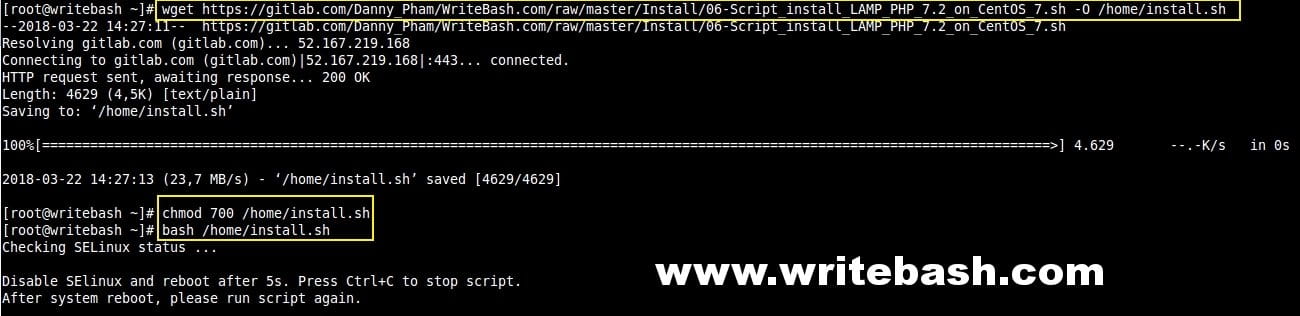
After the server reboot, run the executable commands script again to proceed with the installation.

If your installation is complete, the results shown in the image above, you have successfully installed the LAMP stack.
Check the LAMP stack
First, you visit the info.php page to see if PHP and Apache are working.

Next, you can type the commands below to check the status of each service.
Check out the Apache service.
systemctl status httpdTo check the MariaDB service.
systemctl status mariadbAnd you can type the commands below to check the currently running version of the software.
Check Apache version.
httpd -vAnd check MariaDB version.
mysql -VTo see PHP version.
php -vI have tested the script on success with a CentOS 7 virtual machine, hope you use the script and install successfully.
(This is an article from my old blog that has been inactive for a long time, I don’t want to throw it away so I will keep it and hope it helps someone).


Love it
Thanks! It’s very practical.