
Table of Contents
This article opens the serie. I will introduce to you about the ssh tunnel application in Linux Mint that I wrote with Zenity tool.
The reason I created the ssh tunnel application
When you manage Linux system servers. There will be a lot of times when you need to download files from servers to your computer. For example, log files, you need to download it to your computer for analysis.
One problem is that companies’ systems often have a gateway server. You cannot use scp directly to the server, you need to go through the gateway server.
Recommended Reading: Script auto login ssh
Now you need a ssh tunnel to be able to execute your will.
In Linux, you can type commands to create ssh tunnels, it’s very simple. But how can you remember all of these ssh tunnel commands?
What if you have up to one hundred servers? even more. You need an app for more convenience.
What does this application do?
This app is simply that I use Zenity to create an interface for the ssh tunnel commands that you have already written.
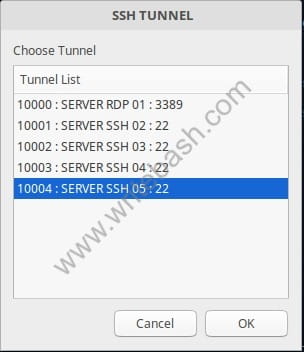
You will have an interface window with the list of ssh tunnels, you just need to click to connect it.
It is not a complete software like other commercial software, I hope you understand this.
What does it look like?
Recommended Reading: Script send email to admin warning ssh login

Conclusion
In the next article, I will guide you step by step to create a simple application for ssh tunnel. Will help you connect to servers more easily and conveniently.
(This is an article from my old blog that has been inactive for a long time, I don’t want to throw it away so I will keep it and hope it helps someone).

