
IBus-Unikey is a software that supports Vietnamese typing on Linux, based on IBus. Beside Ibus, there are other software that supports Vietnamese and this article will guide you how to install IBus-Unikey in Linux Mint.
Install IBus-Unikey in Linux Mint
You open a terminal window and type the following command to install IBus-Unikey on a Linux Mint.
Switch to root user or you must type sudo before each command, type root’s password.

su -To install IBus-Unikey packages.
apt-get install ibus ibus-unikey -yStart and use IBus-Unikey
Once installed, you close the terminal window. Go to your computer’s menu, type in the search box from Input and select IBus Preferences.

Next, select Yes to start IBus-Unikey.
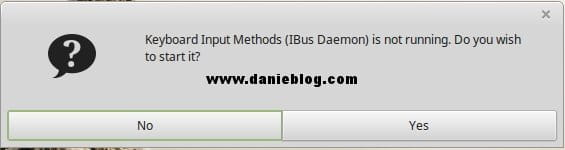
After launching IBus-Unikey, go to the Input Method tab and press the Add button on the right hand side. Here, a small window will appear, just type in the search box from Vietnam and select Unikey.

When you have finished adding Unikey, you can see in the lower right corner of the screen. There is an icon for the image as shown below and you left click on it to open the setup options.
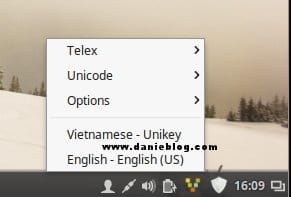
If you can not type in Vietnamese after installation, try turning off all the editing applications. Right-click on the Unikey icon and select Restart. For languages like Vietnamese or Japanese or Chinese, finding software that supports typing in Linux is pretty tedious. Even IBus-Unikey is not 100% stable, according to my personal assessment.
(This is an article from my old blog that has been inactive for a long time, I don’t want to throw it away so I will keep it and hope it helps someone).

