
Table of Contents
How to change the hostname in Ubuntu 16. This article will guide you how to change hostname in Ubuntu server 16. This article can be used for operating systems that are using systemd. Currently, Ubuntu version 16 or later, CentOS version 7 or later, these are the two most popular OS are using systemd.
Check the current hostname
You run the following command to check the current hostname:
hostname
cat /etc/hostname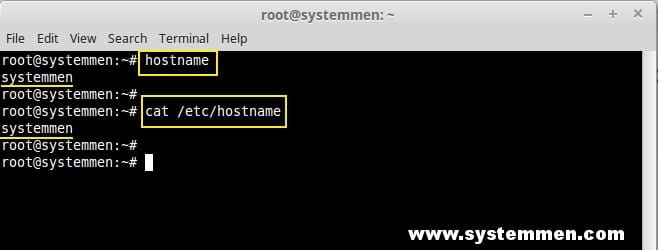
Change hostname in Ubuntu 16
For operating systems that use systemd (Ubuntu 16 or later, CentOS 7 or later), there is support for a command that lets you change hostnames quickly.
hostnamectl
To change the hostname using the hostnamectl command, type the following command:
hostnamectl set-hostname your-new-hostnameFor example, i will set the new hostname is writebash:
hostnamectl set-hostname writebashAfter you run the command, you must exit the current ssh session or logout in the console window. You can then login and check the new hostname.
exitChange hostname in older Ubuntu
For older Ubuntu OSs, do not use systemd. You must change the hostname in the following two files:
nano /etc/hostnameIn the /etc/hostname file, there is only one line. You delete the old hostname in the file and replace the new hostname.
nano /etc/hosts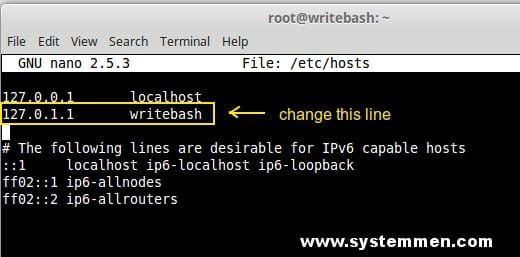
After changing the hostname in the two files above, you reboot the system.
rebootConclusion
This article is about how to change the hostname in the Ubuntu operating system in general and the operating system Ubuntu server 16 in particular. To note with the Ubuntu operating system older than 16, you should change and reboot the system without installing anything.
(This is an article from my old blog that has been inactive for a long time, I don’t want to throw it away so I will keep it and hope it helps someone).

