
Table of Contents
Today I will share with you a simple script to help alert the current coin price on Bittrex that you want through the bash script. Script will alert the price of a coin on Bittrex that you want. Input is quite simple, you choose coin on the floor, for example usdt-btg. That is, you choose BTG to trade with USDT.
Next, you set the lowest price and the highest price you need to alert. This means that if the current coin price is lower than the lowest price you set, a warning popup will appear on the screen. Or if the current price is higher than the highest price you set, the warning popup will also appear.
Script alert coin price
The contents of the script are as follows or you can download the script file from this link.
#!/bin/bash
#
# Author: Daniel Pham
# Website: https://devopslite.com
# Date: 24-07-2018
# Use: simple script use to alert coin price on Bittrex

echo -n "COIN (usdt-btg): "; read coin;
echo -n "LOW PRICE: "; read lprice;
echo -n "HIGH PRICE: "; read hprice;

while true
do
   COIN=`curl -s https://bittrex.com/api/v1.1/public/getmarketsummary?market=$coin | python -mjson.tool | grep Last | awk '{print $2}' | sed 's/,//g'`
   sleep 0.5

   compare_low=`echo "$COIN <=$lprice" | bc`
   if [[ $compare_low -gt 0 ]]; then
      zenity --warning --text="$coin lower than $lprice"
   else
      echo "$COIN"
   fi

   compare_high=`echo "$COIN >=$hprice" | bc`
   if [[ $compare_high -gt 0 ]]; then
      zenity --warning --text="$coin higher then $hprice"
   else
      echo "$COIN"
      echo "----- $(date) -----"
   fi
done
I will explain the script above:
- The first 3
echocommands will ask you to enter the coin name, the lowest price and the highest price that you need to track. - The next
while truestatement produces an infinite loop until you stop the script by pressingCtrl + C. - The
curlcommand will get the last price of the coin you entered through the Bittrex API. Ex: 29.5 - 2 block compare price. Block above will compare the last price with the lowest price you want to track. If the current price is lower, the script uses zenity to display a warning window. Same for the bottom block with the highest price you need to track.
Script is really simple. I tested this script in Linux Mint 18 and it’s ok.
How to use script
OK, so how to use this script? You download this script to your computer, example save it in Desktop. Then open the terminal and type
chmod +x Script_alert_coin_priceYou can save this script with any name that you want, my example it”s name is “Script_alert_coin_price”.
And then, you type this command to run script:
./Script_alert_coin_priceAt start, the script will ask you to enter three things as image below:
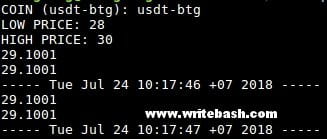
- COIN: you tye the coin’s name, ex: usdt-btg, btc-btg, btc-neo…
- LOW PRICE: you type a number, ex: 28, 30.5, 50.8…
- HIGH PRICE: you type number just like LOW PRICE.
Price alert window
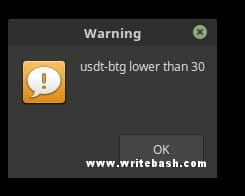
When the current price is lower than the lowest price you set, the following window will appear in the middle of your screen.
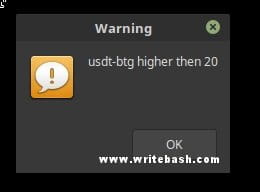
Or when the current price is higher than highest price you set.
That’s it. A simple script to help you track the coin price on your computer. Just have fun !!!
(This is an article from my old blog that has been inactive for a long time, I don’t want to throw it away so I will keep it and hope it helps someone).

