
Table of Contents
Welcome, fellow infrastructure enthusiasts! This tutorial dives deep into the world of Terraform providers, a fundamental component of Infrastructure as Code (IaC). We’ll explore what they are, why they’re crucial, and how to leverage them effectively. Understanding Terraform providers is key to mastering Terraform and automating your infrastructure deployments.
Understanding Terraform Providers
Terraform providers act as the bridge between your Terraform code and various cloud platforms or services. They define the resources available for management within each platform. Essentially, they provide the language Terraform uses to interact with your infrastructure.
What are Terraform Providers?
Terraform providers are plugins that extend Terraform’s capabilities to manage resources in different environments. They provide a standardized way to interact with APIs and manage infrastructure. Each provider is responsible for interacting with a specific cloud provider, on-premise system, or other service. This allows you to manage infrastructure across different environments using a single tool.
Why are Terraform Providers Important?
Using Terraform providers simplifies infrastructure management. They abstract away the complexities of different APIs, providing a consistent interface for managing resources. This ensures consistency across your infrastructure regardless of the underlying platform. Automation becomes easier and more reliable.
Popular Terraform Providers and Their Applications
Many Terraform providers exist, catering to diverse needs. Let’s explore some popular options.
The AWS Provider
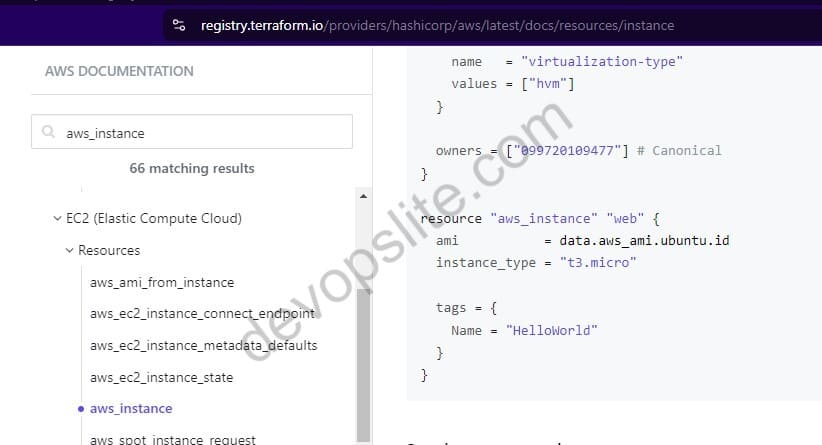
The AWS provider is incredibly popular, allowing you to manage various AWS services. It’s essential for anyone working with Amazon Web Services. You can create EC2 instances, S3 buckets, and much more.
Example: Creating an EC2 Instance
resource "aws_instance" "example" {
  ami           = "ami-0c55b31ad2299a701" # Replace with your AMI ID
  instance_type = "t2.micro"
}
The Azure Provider

The Azure provider manages resources within Microsoft’s Azure cloud. It offers comprehensive support for various Azure services. Similar to the AWS provider, it streamlines Azure resource management.
Example: Creating a Virtual Machine
resource "azurerm_linux_virtual_machine" "example" {
  name                = "example-vm"
  resource_group_name = azurerm_resource_group.example.name
  location            = azurerm_resource_group.example.location
  size                = "Standard_B2s"
  admin_username      = "adminuser"
  # ... other configurations ...
}
The Google Cloud Provider

The Google Cloud provider handles Google Cloud Platform (GCP) resources. It’s a powerful tool for managing GCP’s various services, offering a consistent approach to GCP infrastructure management.
Example: Creating a Compute Engine Instance
resource "google_compute_instance" "default" {
  name         = "instance-1"
  machine_type = "n1-standard-1"
  zone         = "us-central1-a"
  boot_disk {
    initialize_params {
      image = "centos-cloud/centos-7"
    }
  }
}
Choosing the Right Terraform Provider
Selecting the appropriate Terraform provider depends on your infrastructure’s needs. Consider the services you need to manage and the cloud platform you’re using. Each provider has its own specific features and capabilities.
Factors to Consider
When choosing a provider, look at the provider’s documentation for a comprehensive overview of its features. Also check the provider’s community support and the frequency of updates. A well-maintained provider ensures stability and compatibility.
Advanced Terraform Provider Usage
Terraform providers can be utilized in complex scenarios. You can create modular code, use variables and modules for reusability and maintainability. This allows for scalable and efficient infrastructure management.
Using Variables and Modules
Employing variables and modules allows for parameterization and reusability in your infrastructure code. This reduces redundancy and enhances the overall maintainability of your Terraform configurations.
Example using a Variable
variable "instance_type" {
  type = string
  default = "t2.micro"
}

resource "aws_instance" "example" {
  instance_type = var.instance_type
}
Troubleshooting Terraform Providers
Troubleshooting issues with Terraform providers often involves verifying provider versions, checking API keys and credentials, and consulting the provider’s documentation. Understanding error messages is crucial for effective debugging.
For more advanced troubleshooting, you can leverage the Terraform debugging features and consult the community forums for assistance. Remember to always refer to the official provider documentation for the most accurate and up-to-date information. You can find comprehensive guides and examples on the official Terraform documentation site.
Conclusion
Mastering Terraform providers is essential for anyone serious about Infrastructure as Code. They empower you to manage diverse infrastructure efficiently and reliably. By understanding their capabilities and how to use them effectively, you can significantly improve your workflow and create more robust and scalable infrastructure.
Explore the different providers, experiment with examples, and don’t hesitate to delve deeper into the documentation. The journey of learning Terraform and its powerful providers is well worth the effort. Happy coding!
For additional learning resources, consider exploring the official Terraform documentation: https://www.terraform.io/ and HashiCorp’s Learn platform: https://developer.hashicorp.com/terraform/tutorials. Furthermore, the community-driven Terraform Registry offers a wealth of community-contributed providers: https://registry.terraform.io/browse/providers.

